- Published on
If you *must* use Microsoft Access on .NET on Linux
I'm working on migrating an old codebase that was written on .NET Framework to a modern ASP.NET Core 8 application. One of the features we must preserve is the ability to generate Access database (.mdb) export files. The old app was deployed on a Windows machine; the new one must work on Linux. This is where I hit a roadblock when I found that the OleDb driver (the driver used to connect to Access databases) cannot run on Linux because it needs a Windows COM component.
After doing some research online, there are a few options that people suggested:
- Migrate to other database (pgsql, mysql etc,)
- Use mdb-tools
- Deploy a thin Windows container app whose only purpose is to export the Access database. The .NET app will trigger it via an endpoint or command.
- Use UCanAccess, which is a Java library that can read/write Access database files.
I tried the options in order from top to bottom.
- What? Nope! I must use Access.
- I tested it on Linux and Windows. It can read from Access, but not write to it (bruh..)
- Well, this might work, but it adds complexity because I would need to maintain different apps and rewrite the component from C# code in Java.
- This works! That's why I'm writing this whole blog post. Read along.
I have actually used UCanAccess previously, but not directly. UCanAccess is included in DBeaver, the database management tool that I use. So, before going any further, I tested the driver's read and write capabilities on both Windows and WSL. It works like a charm! Now, I just need to integrate it with my .NET app.
UCanAccess is a Java library, so how do we even use it in .NET? Meet IKVM, a tool that allows you to translate a JAR file into a .NET assembly (.dll).
First, you'll need the UCanAccess JAR files. You can get them from the UCanAccess download page (download the *bin.zip, not *-src.zip). The latest version at the time of writing is 5.0.1. Read the steps below:
Extract the archive.
Merge all the JAR files into one fat JAR file. Run
jarin your terminal to check whether you have the JDK installed. If not, run the command below to install it.Debian/Ubuntu:
sudo apt install default-jdkmacOS:
brew install java
echo 'export PATH="/opt/homebrew/opt/openjdk/bin:$PATH"' >> ~/.zshrc
source ~/.zshrc
Then,
cdinto theUCanAccess-5.0.1.binfolder and run the command below to create a 'fat' JAR file.mkdir merged && cd merged && jar xf ../ucanaccess-5.0.1.jar && jar xf ../loader/ucanload.jar && for j in ../lib/*.jar; do jar xf "$j"; done && jar cf ../ucanaccess-all.jar . && cd .. && rm -rf mergedThis command will create a new file called
ucanaccess-all.jarin the same folder. This file contains all the classes from the original UCanAccess Jar files.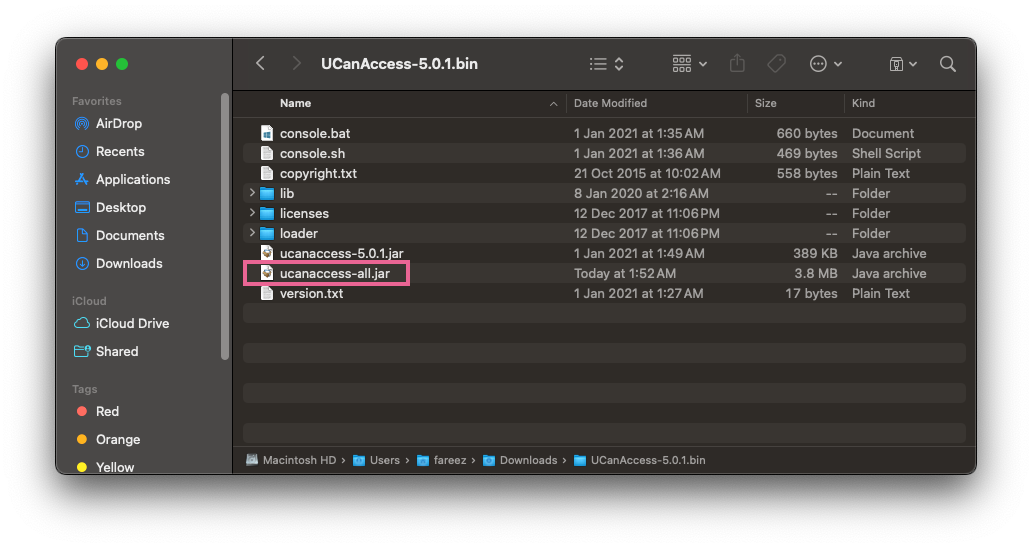
UCanAccess Jar files
Now, on the .NET side, first install IKVM from NuGet. Put the file ucanaccess-all.jar somewhere in your project folder, then reference it in your .csproj file as shown below:
<ItemGroup>
  <IkvmReference Include="UCanAccessBin\UCanAccess-5.0.1.bin\ucanaccess-all.jar">
    <AssemblyName>ucanaccess</AssemblyName>
    <AssemblyVersion>5.0.1.0</AssemblyVersion>
    <AssemblyFileVersion>5.0.1.0</AssemblyFileVersion>
  </IkvmReference>
</ItemGroup>
When you build the project, IKVM will convert the JAR file into a ucanaccess.dll file in the output folder. You can then reference this DLL in your program.
Here is a basic example of how to connect to the database:
// load ucanaccess dll
ikvm.runtime.Startup.addBootClassPathAssembly(System.Reflection.Assembly.Load("ucanaccess"));

// Load driver
java.lang.Class.forName("net.ucanaccess.jdbc.UcanaccessDriver");

// build the connection string
var accessPath = "/Users/fareez/Downloads/Access_sample.mdb";
var connectionString = $"jdbc:ucanaccess://{accessPath}";
var connection = java.sql.DriverManager.getConnection(connectionString);

// do something with the connection
// var statement = connection.createStatement();
That's all. Please see this repo for a full code example, instructions, and results. It's a bit peculiar to see Java code inside a .NET project, but this is the only way to interface with an Access database within a .NET project. I hope this can help you if you are in the same situation as me.